
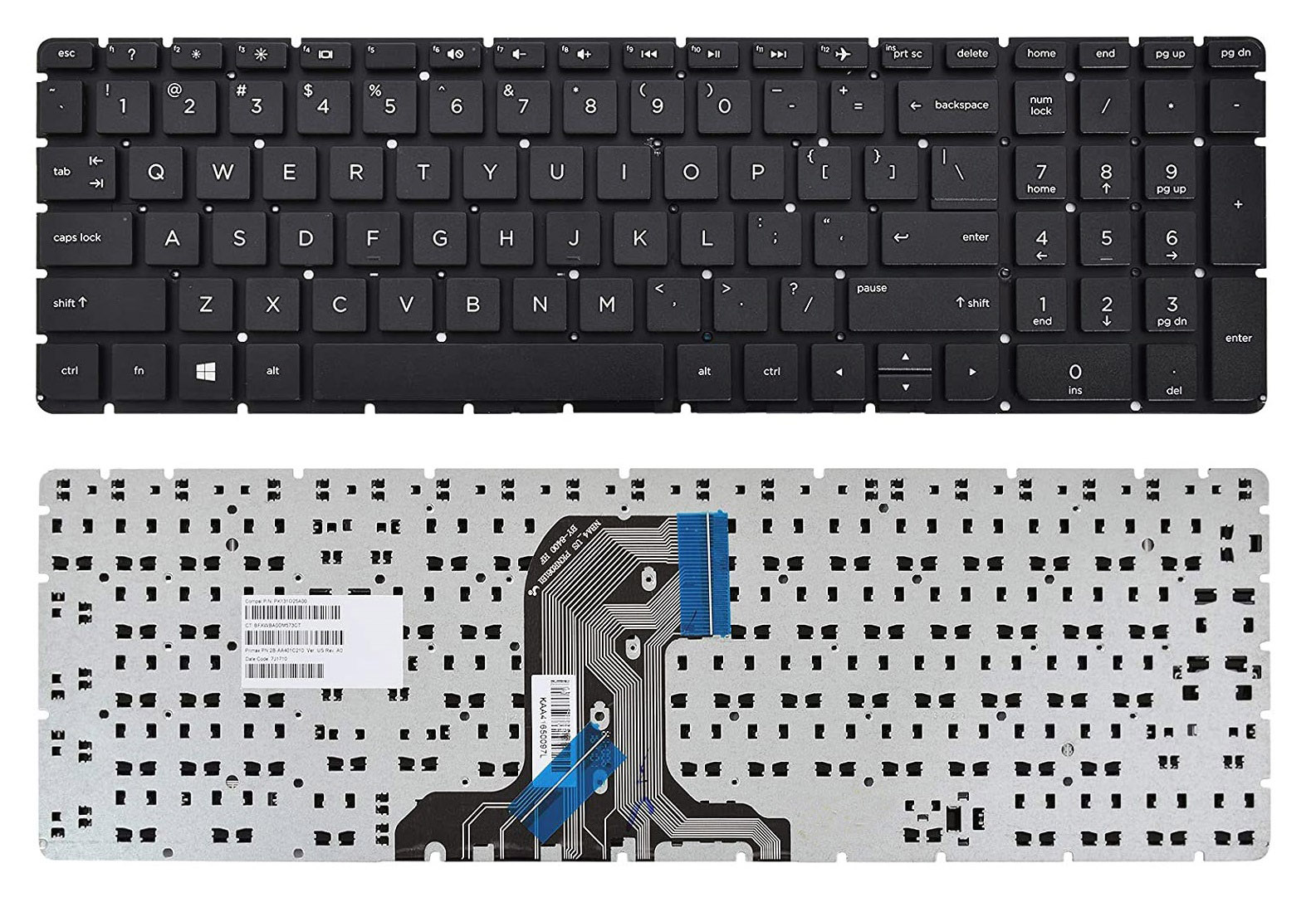
Description
The HP 250 G4 Laptop Keyboard is a reliable replacement keyboard specially designed for HP 250 G4 series laptops that use a non-backlit (non-light) keyboard configuration. It is built to restore smooth typing performance when your original keyboard becomes faulty, damaged, unresponsive, or worn out from long-term use.
This keyboard features a standard QWERTY layout, durable key structure, and an internal ribbon connector that fits compatible HP 250 G4 notebook models. It is ideal for replacing keyboards affected by liquid damage, missing keys, typing errors, or physical wear.
Product Features
- Non-backlit (non-light) keyboard design
- Compatible with HP 250 G4 laptop series
- Standard QWERTY keyboard layout
- Smooth and responsive key feedback
- Durable and lightweight construction
- Internal ribbon cable connector
- Suitable for replacement and repair purposes
Compatibility Information
Before placing your order, please confirm the following carefully:
- Your laptop model is exactly HP 250 G4
- Your existing keyboard is a non-backlit / non-light version
- Keyboard frame shape and ribbon connector match your old keyboard
- Your preferred keyboard layout matches your region (US/UK layout)
Common Keyboard Problems This Replacement Can Fix
This replacement keyboard may help solve issues such as:
- Certain keys no longer responding
- Multiple keys typing automatically
- Water or liquid damage
- Broken, loose, or missing keys
- Keyboard not detected by the system
- Delayed or inaccurate typing response
- Keyboard shorting or random key behavior
Installation Tips
For safe installation and better performance:
- Power off the laptop completely before repair
- Disconnect the battery before removing the old keyboard
- Handle the ribbon cable gently to avoid tearing
- Avoid touching connector pins with metal objects
- Carefully lock the ribbon connector during installation
- Test all keys before fully assembling the laptop
User Maintenance Tips
To help extend the lifespan of your keyboard:
- Avoid eating or drinking near your laptop
- Use a soft brush or compressed air to remove dust regularly
- Do not press keys excessively hard
- Keep the laptop away from moisture and humid environments
- Use a keyboard protector if working in dusty areas
- Shut down properly to reduce unnecessary hardware stress
Important Customer Notice
⚠️ Please compare your old keyboard’s ribbon cable, frame shape, mounting points, and layout carefully before purchase to ensure full compatibility with your laptop model.
⚠️ Improper installation may damage the keyboard connector or motherboard. Professional installation is recommended if you are unfamiliar with laptop repairs.
Reviews
There are no reviews yet.